
How a child picks a picture: touch, switch, eye gaze
To "say" something with a picture, a child first has to pick it. Most children just touch it. But if their hands don't cooperate well, there are other ways — a switch or eye gaze. Here's how each works, and when to ask a specialist.
First, a comfortable position
First, look at how your child is sitting. When their head is upright and their hands are in front of them, it's easier both to look at the pictures and to reach them. Place the board or tablet so your child can see it without tipping their head back or down.
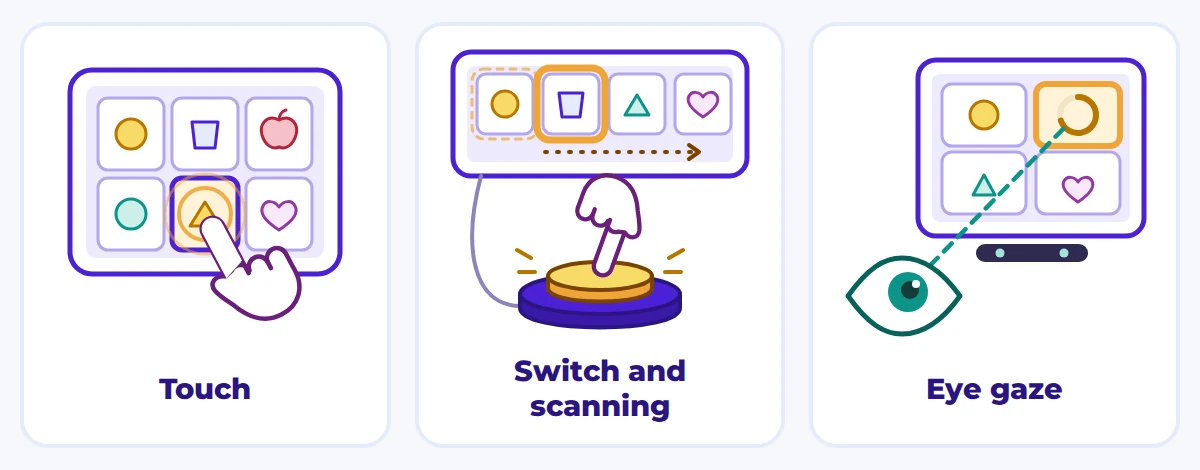
Touch
For many children, this is the simplest and quickest way. The child touches the picture with a finger, a fist, a palm or a stylus — on paper or on a screen.
That's how the EYA app works, for example: the child touches a card on a phone or tablet — and the word is spoken straight away.
If your child often misses, try these.
- Use fewer pictures, but bigger ones.
- Leave more space between them.
- Put the tablet on a stand at an angle so it doesn't slide.
- Let them touch with any part of the hand — accuracy isn't the point.
A switch
If touching is hard, a big button called a switch may be a good alternative. It can be pressed with an elbow, the head, a knee — whatever movement is easiest for your child. Often it works like this: the pictures on the screen light up one after another, and the child presses the switch when the one they want lights up.
It's slower than touch and takes time to learn, but it lets a child who finds hand movements hard choose on their own.
You can try the same idea with no technology at all. You point to the pictures one by one and name them, and your child gives a signal when you reach the one they want: a sound, a nod or a hand movement. Agree on the signal beforehand.
Eye gaze
For children with severe movement difficulties, there are special devices with a camera that can see where the child is looking. The child holds their gaze on a picture — and that's how they choose it. Such a device needs setting up for the child and is best chosen with a specialist.
Looking works on paper too. Put two pictures in front of your child, well apart, and ask "Which one do you want?" The one they look at longer may be their choice. Say it out loud and check that you've understood. Don't rely on one try: watch over several tries whether their look is a reliable signal, and if you're unsure, ask a specialist.
EYA does not offer Eye-gaze selection.
When to ask for an access assessment
In an access assessment, specialists work out the easiest way for your child to choose: which hand or movement, which position, what size of picture. It's worth asking for one if:
- your child often misses a picture, even a big one;
- they tire quickly from touching, or get upset;
- they can only move their head, a foot or their eyes;
- you're planning to buy a dedicated device or a switch.
The people who can help are a speech and language therapist who works with AAC, an occupational therapist and a physiotherapist. In Ukraine you'll find them at rehabilitation and assistive technology centres, or through your local inclusive resource centre (ІРЦ). Bring a short video of how your child chooses now.
Questions parents ask
Can a child use more than one way?
Yes. At home a child might touch a board, and when they're tired, choose between two cards by looking. What matters is that adults understand each way they use. Our guide "Signs, cards, tablets" covers the different kinds of AAC.
How many pictures should be on the screen?
As many as your child can easily see and reliably choose. If choosing often doesn't work, use fewer, bigger pictures. If it works reliably, you can add more.
Do we have to buy a device that follows the eyes?
No. You can start with paper cards and choosing one of two by looking. Whether such a device is needed is best decided after an assessment, together with a specialist.
What can we do while we wait for a specialist?
Make a simple board with a few big pictures and watch how your child points most easily. Our guide "A first communication board in one evening" shows how.
Series “AAC: first steps” — part 4 of 8. Previous: Signs, cards, tablets: the kinds of AAC. Next: A first communication board in one evening. All parts.
How EYA helps
- Picture-card board — A grid of picture cards in folders; a tap speaks the card and adds it to a sentence the child can say or send.
- Display settings — Columns and rows, font and card size, theme, paging or scrolling, hide text or pictures.
References
- Augmentative and Alternative Communication — ASHA Practice Portal
- What is AAC? — Communication Matters (UK AAC charity)
- AAC Assessment Services — Communication Matters
- Позиціонування дитини з руховими порушеннями та підбір обладнання — БФ «Інститут раннього втручання», ЮНІСЕФ Україна
- Universal Core vocabulary and communication systems — Project Core (UNC Center for Literacy and Disability Studies)