
A paper backup board: what to do when the tablet dies
A tablet can run flat, go in for repair or get left at home, and your child still has things to say. A paper backup board with the same words as the tablet lets them keep "talking" while the device isn't there. You can make one in advance, without a rush.
When a backup board helps
Specialists suggest planning a simple backup in advance — for example, a laminated paper board for when the device isn't working or the power goes out. It can help when:
- the tablet dies on a journey, in a queue or at a friend's house;
- the device is being repaired, which can take weeks;
- you're in the bath, at the pool or the sandpit, or having a meal with juice — places where you'd rather not risk the device;
- there's a power cut and nothing to charge from.
Paper and electronic AAC can complement each other. Our guide "Signs, cards, tablets: the kinds of AAC" covers the different kinds.
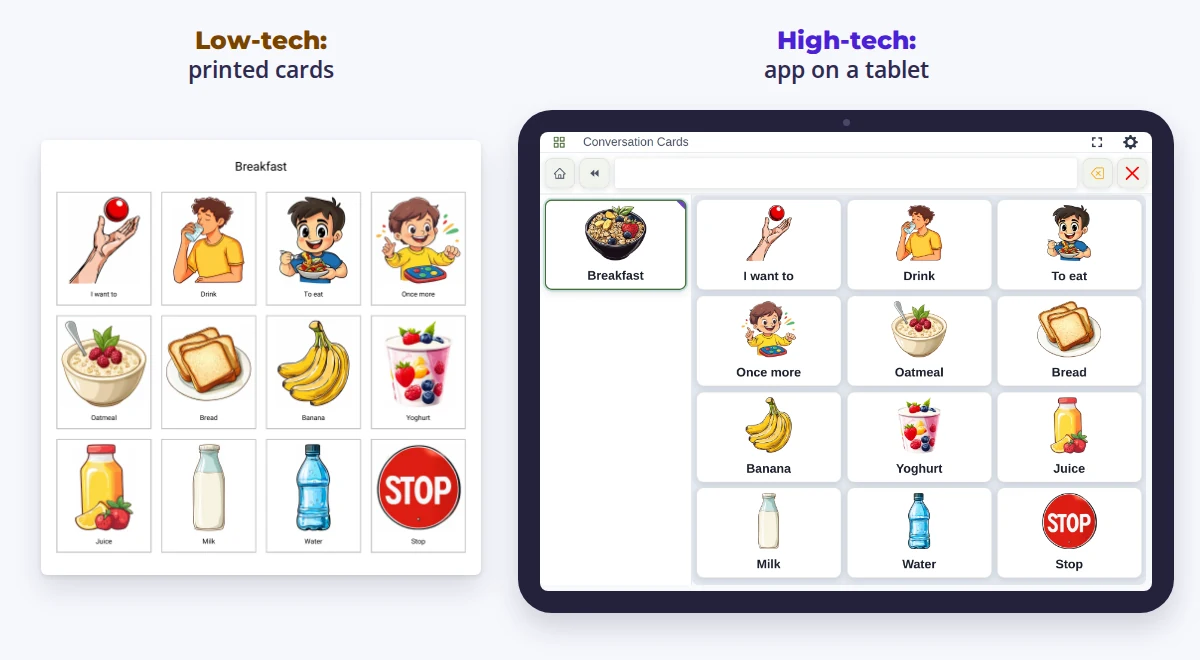
Five steps
- Choose the words. Take the ones your child uses most, plus a few everyday words: "more", "stop", "yes", "no", "help", "don't like", "finished". Our guide "10 words to start with" can help you choose.
- Use the same pictures. Where possible, use the same symbols or photos as on the tablet, so they are easier for your child to recognise.
- Keep the same places. If you can, lay the cut-out cards on the sheet the way they sit on the screen. Your child gets used to where a word "lives" and is likely to look for it in the same spot on paper.
- Laminate it. A laminated sheet copes with splashes, spilt juice and sticky fingers better than plain paper.
- If practical, make several copies. You could keep one in the backpack or bag, one in the car, one at nursery or school, and one at home.
In EYA you can choose the cards you need and save them as a PDF to print. And when it's the internet that's gone rather than the battery, the board in the app still works without a network, because it's stored on the device itself.
How to "talk" on paper
A paper board doesn't say words out loud. So when your child chooses a picture, say the word yourself — the way the tablet would — and respond to it. Model words on the paper board as you do on the screen: point to one or two key words while you talk with your child. Our guide "Show it yourself: how to model AAC" explains how.
Not all children point with a finger. If your child selects in another way, work with their specialist to find an accessible way for them to use the paper board. One way: you point to each picture in turn and name it, and your child lets you know "yes" in their usual way when you reach the one they want.
And show the backup board to everyone who spends time with your child: grandparents, nursery staff, babysitters. Make sure the adults know where it is and how to use it.
Questions parents ask
How many words should go on the backup board?
There is no single right number: choose the number and size of symbols around your child's vision, access method, language needs and familiar system. If the tablet has a lot of words, make several sheets by topic or a small folder of pages.
Can I just print a screenshot?
You can, if the pictures come out big and clear enough for your child. Check whether your child can recognise and access them as easily as they can on the screen.
How often should I update the paper board?
When important new words are added to the tablet, update the paper board where practical. Remember to swap the old copies in the bag, the car and at nursery.
What if my child doesn't want the paper?
Try using it while the tablet still works too — in the bath or on a walk, for example. That way it can become familiar before you need it.
Series “AAC: first steps” — see also: all parts.
How EYA helps
- Print cards to PDF — Export chosen cards as printable sheets for device-free sessions.
- Works offline — The child's board is stored on the device and works with no network; changes sync on reconnect.